

Darmowe instrukcje obsługi XPLORA – czytaj, pobieraj i drukuj
1 Instrukcje
Instrukcje
Kategorie

XPLORA Manuals
Introduction to Product Documentation
XPLORA is a pioneering brand in the consumer electronics sector specializing in smartwatches and digital devices designed specifically for safety and communication for children. Their primary goal is to provide peace of mind for parents while granting children a degree of independence through technology. The availability of comprehensive manuals is a crucial component of the total product experience. These documents guide users through setup, operation, and long term maintenance procedures. Without proper documentation, users might struggle to utilize the full potential of the advanced hardware features. The manuals serve as the definitive reference for owners to understand functionality limits and software capabilities. They cover hardware buttons, screen navigation, and connectivity protocols essential to the device lifecycle. Understanding these documents ensures that the user gets the most out of their investment without unnecessary frustration or errors during the initial configuration phase.
Overview of the XPLORA Ecosystem
XPLORA products are part of a larger ecosystem that includes the physical watch hardware and a companion mobile application. The software application acts as the control center for the parent. It allows for the configuration of the watch settings remotely. The manual serves as the bridge between these two distinct components. It explains how the hardware signals are translated into data the app can process. This includes location data, voice messages, and activity logs. Each manual is tailored to the specific generation of the device to reflect updates in technology. Older models might require different pairing methods compared to newer models with updated Bluetooth capabilities. It is vital for users to read the introduction section to understand the terminology used in subsequent chapters regarding features like geofencing or emergency alerts.
Accessing the Official Documentation
Website Navigation
Finding the correct manual for your specific device is the first step in utilizing the product effectively. XPLORA maintains an extensive online library accessible through their official website. Users should locate the support section on the homepage to input their model number or select from a dropdown menu of current products. Each model has its own specific PDF guide which may be different from general instructions. This ensures accuracy regarding the interface layout and feature set unique to that firmware version. It is highly recommended to download the latest version to avoid outdated information regarding app syncing or security patches. The website often includes video tutorials alongside the text based manuals to provide visual aids for complex tasks.
App Integrated Guides
Some newer XPLORA devices allow users to access help information directly within the device menu. This in app documentation provides quick access to basic settings without needing to open a web browser. The manual describes how to navigate the settings menu on the watch itself. It outlines which buttons correspond to specific functions. This is particularly useful if the parent smartphone is temporarily unavailable. Users can check battery status, reset the device, or change basic preferences directly on the watch interface. The integrated guide simplifies the process for children using the device independently during supervised activities.
Key Models and Their Specific Guides
XPLORA X5 Series Documentation
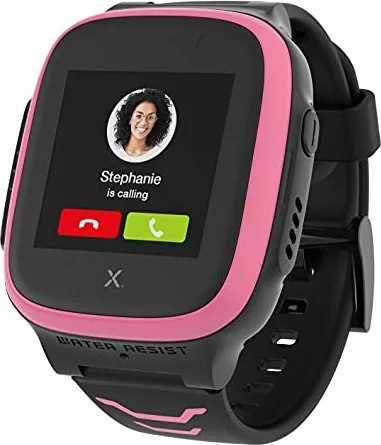
The X5 series represents one of the most popular lines in the XPLORA lineup. The manual for this series focuses heavily on the parent app integration known as XPLORA Go. It details how to pair the watch with a smartphone via Bluetooth. The guide explains how to manage contacts, set up voicemails, and configure voice messaging limits. There is specific instruction on the charging mechanism which differs slightly between early X5 models and newer iterations. Battery life expectations are also clearly stated to help parents manage charging schedules. This series is often the entry point for many families and therefore has extensive documentation covering basic safety setups.
XPLORA X6 Series Documentation
The X6 series introduces upgraded camera capabilities and enhanced GPS tracking accuracy. The manual for this model includes a dedicated section on media settings. Users can learn how to adjust camera quality and storage limits directly from the device interface. The documentation also covers the more advanced fitness tracking features found in this generation. Understanding these settings requires reading the detailed pages on activity monitoring. The guide provides step by step instructions for resetting the device if it becomes unresponsive. It also outlines the procedure for performing a factory reset securely to protect data privacy. Advanced users can find information regarding Wi-Fi hotspots and how these interact with mobile data plans.
Setting Up Your Device Successfully
Initial Pairing and App Configuration
The setup process is the most critical phase for new users. The manual emphasizes downloading the companion application before attempting to turn on the watch. This app acts as the central hub for managing all device functions. The documentation walks users through creating an account and verifying their identity. Next, it instructs on how to add a device ID to the account list. This step is vital for enabling notifications and location alerts on the parent phone. The guide includes troubleshooting tips if the Bluetooth connection fails during this pairing stage. It suggests restarting both devices if the sync does not occur immediately. Proper configuration at this stage prevents many common issues that arise later during usage.
Safety Features Configuration
Safety is the core value proposition of XPLORA products. The manuals detail how to activate the SOS emergency mode. This feature allows a child to press a specific button to send an alert to multiple contacts. The instructions explain how to define who these contacts are within the app. Geofencing is another key area covered in the documentation. Parents can draw safe zones on a map and receive alerts when the child enters or leaves these areas. The manual explains how to adjust the sensitivity of the alarm to reduce false positives. These settings ensure that parents are informed immediately if something goes wrong without being overwhelmed by notifications.
Troubleshooting Common Issues
Connectivity Problems
Connectivity issues are the most common reason users consult the manual. The guide provides a checklist to resolve Bluetooth sync errors. It recommends checking if the phone settings allow app background data usage. Sometimes restrictions on power saving modes can prevent the watch from updating location data. The text advises ensuring the SIM card is active and has a valid data plan. If these steps fail, the manual suggests resetting the network settings on the parent device. It also mentions checking for interference from other wireless devices that might disrupt the signal frequency.
Battery and Charging Concerns
Battery performance is another frequent topic regarding XPLORA devices. The documentation explains the charging cycle expectations. Users should know that the LED indicators change colors to show charging status. Blue typically indicates full charge while red indicates low power. If the battery drains quickly, the manual suggests checking background apps or reducing screen brightness settings. It also provides guidance on charging cable maintenance to prevent physical damage to the charging port. Cleaning the contacts with a dry cloth is sometimes recommended to ensure a good electrical connection.
Maintenance and Software Updates
Keeping the software current is essential for security and performance. The manual describes the over the air update process. This ensures the device has the latest security patches. Parents must monitor whether updates are available through their app dashboard. The instructions detail how to manually check for firmware versions if automatic updates are skipped. Regular cleaning of the watch face is also recommended to maintain touch sensitivity. The guide notes that harsh chemicals should be avoided to protect the screen coating. Water resistance ratings should be respected to prevent internal moisture damage.
Conclusion and Ongoing Support
Summary of Essential Documentation
In summary, XPLORA manuals are comprehensive resources designed to empower both children and parents. They transform a simple gadget into a safe and connected tool for the family. By following the instructions provided in these guides, users can maximize the lifespan and utility of their hardware. Continued access to updated documentation ensures that new features are utilized correctly. The commitment to clear and detailed instructions reflects the brand dedication to user safety and satisfaction. For any further questions, official support channels are recommended over third party forums. This ensures accurate and verified information is applied to the device configuration. The manuals remain the best source for resolving any unexpected behavior or feature inquiries.
Final Safety Considerations
Finally, the manual reiterates the importance of parental supervision. Technology is a tool that enhances safety but does not replace it. Parents are encouraged to review settings with their children periodically. This ensures that safety protocols remain active and understood by the user. The documentation highlights that devices should be kept charged to ensure emergency features work. Ignoring updates might leave the device vulnerable to security risks. Therefore, manual reading is not a one time task but an ongoing requirement for responsible ownership. By staying informed through these resources, the entire family can enjoy the benefits of the technology with confidence.
Szukaj w: 67 732 Instrukcje online


Wpisz markę lub model